The box model is made up of one or a combination of 3 commands: margins, padding and borders. They nest like this:
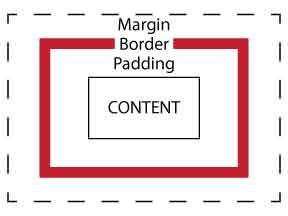
Margins are like invisible force fields around the outside of a piece of information. Pixel values added to the margin command will add a "force field" of that size around the information, so that nothing else can get close to the information (unless it is in the CSS background layer) - it gives the information some space.
Padding acts similarly to a margin, in that it creates space around a piece of information. The difference between a margin and padding is that a margin adds empty space directly to the outside of the information; padding effectively increases the total size of the space and then indents the information to bring it back to its original size. This means that you can use padding to add colored backgrounds, like a mat in a picture frame. Whether you use margins or padding becomes really important if you are using borders, because padding always sits inside a border, whereas margins always sit outside a border.
Borders are exactly as they sound - they are like picture frames around a set of information. Borders can be styled with colors and set styles such as dashes, groove or dotted.